
The search bar is often the starting point for a website visit. Especially for websites with large product selections or informational content, this element serves as a crucial link between the visitor and the desired result. A well-functioning search feature not only helps visitors find what they’re looking for more quickly, but also ensures a pleasant user experience and a higher likelihood of conversion.
In this article, we explain how smart, personalized search functionality works, which elements are important, and how the technology is structured behind the scenes.
Why the Search Functionality Is Becoming More Important
Many users skip the menu structure or filters and go straight to the search bar. Especially on mobile, this is an efficient way to quickly find the right product or information. That’s why it’s worth considering this feature not just as a basic function, but as part of the customer journey.
A standard search function usually displays only a list of exact-match search results. Modern tools, such as WiQhit, go much further: they use algorithms, user behavior, and preferences to improve the search experience.
Here's how it works on the front end: real-time search results
As you type in the search bar, relevant suggestions appear immediately. These are based on multiple sources, such as:
Product Feed (product name, product code)
Stock Status
Categories
Descriptions (if no match is found for the product name)
The search engine has a clear priority:
First, the search is performed on primary fields, such as the product title and code.
If there is no match there, secondary fields—such as product descriptions—are checked.
This allows users to quickly see the most relevant suggestions without being overwhelmed by less relevant results.
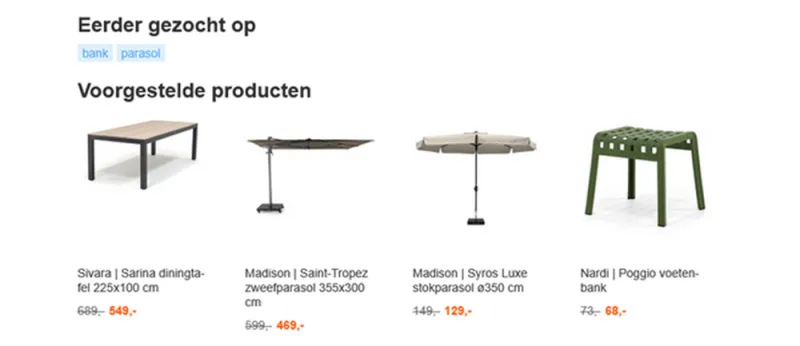
In addition, it is possible to display suggestions even without any input. For example:
Previously Searched Terms
Popular Products
Suggested Categories
Behind the Scenes: Error Correction, Synonyms, and Logic
Not every visitor types without mistakes or uses the exact terms as they appear in the product feed. That’s why there are several ways to optimize:
Synonyms: Add alternative search terms to products or categories.
Error Correction: Minor typos or spelling errors are automatically detected.
Alternative Words: “laptop sleeve” may also return results for “laptop bag” if the content matches.
These features ensure that a search always results in a relevant suggestion.
Smart Sorting and Recommendations
The order in which search results appear at the top can be influenced by:
Relevance to the search term entered
Popularity in recent times
Price (for example, cheapest first)
Inventory
This way, a search function can not only help users find what they're looking for, but also drive conversions—for example, by displaying products that are on sale or in stock higher in the search results.
In addition, personalized suggestions can also be made based on the user's previous behavior on the website.
Search as part of personalization
A personalized search bar can add significant value to your customer journey. Because users can find what they’re looking for more quickly—even if they make a mistake or use different words—they’re more likely to order a product or continue browsing. Plus, with the right settings, you can optimize for relevance, inventory, and campaigns.
By combining search behavior with other personalization tools, such as product recommendations or behavioral segmentation, a cohesive and user-friendly experience is created.
In summary
A smart search bar is more than just a tool for finding products. It’s a strategic component of your website that enhances the customer experience in real time. With features such as auto-correction, synonyms, smart suggestions, and personalized results, you can help visitors find what they’re looking for faster and more effectively.